
Download Ganttic – Online Project Management, Resource Scheduling & Real‑time Collaboration
Overview
Ganttic is a cloud‑based project management tool that focuses on simple, visual scheduling of resources and tasks. Built around an intuitive Gantt‑chart interface, the platform lets teams create, adjust, and share timelines in just a few clicks. Within roughly thirty minutes you can launch a fully functional project schedule, assign resources, and watch collaboration unfold in real time.
Unlike heavyweight solutions such as Microsoft Project, Ganttic offers a lightweight, drag‑and‑drop environment that is ideal for small‑to‑medium teams that need a fast, secure way to track time spent on projects without the overhead of complex document management or automated notifications. The software also includes instant chat, CSV‑exportable reporting, and a clean calendar view that toggles between month and week perspectives. While it may lack some advanced features like built‑in document storage or email/SMS alerts, its streamlined approach makes it a perfect fit for businesses that value speed, ease of use, and a pure time‑management experience.
Key Features
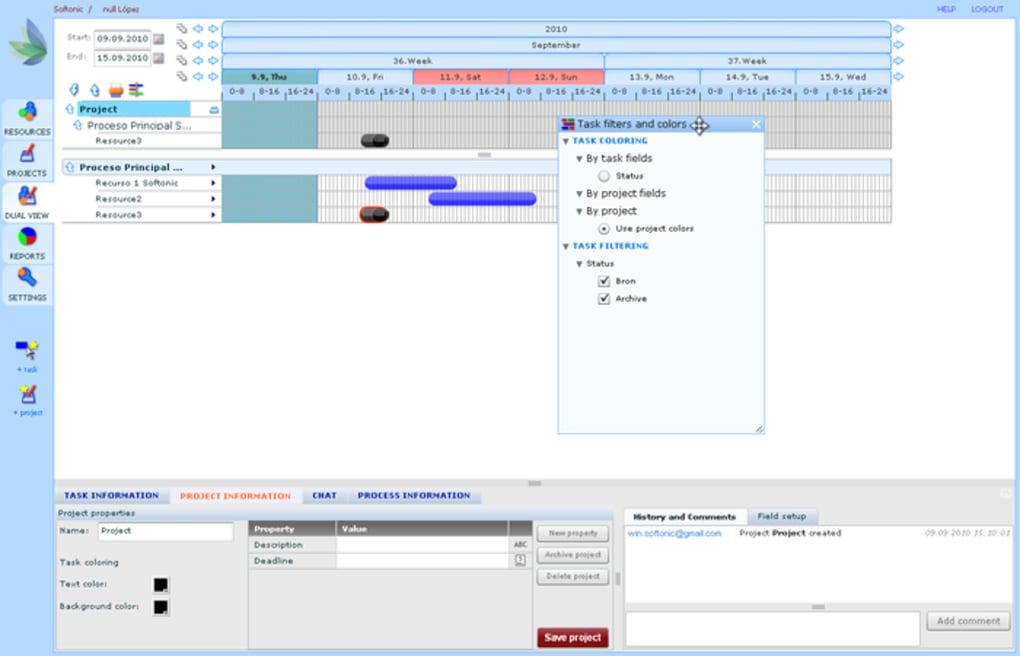
- Interactive Gantt‑chart canvas with drag‑and‑drop task arrangement.
- Real‑time collaboration: all changes are instantly visible to team members.
- Resource allocation view that highlights over‑ and under‑utilised staff.
- Instant in‑app chat for quick questions and status updates.
- Customizable calendar tabs (month, week, day) for precise timeline control.
- CSV report generator for exporting project data to spreadsheets.
- Simple role‑based access – administrators can set view/edit permissions.
- Responsive web design – works on Windows, macOS, Android, and iOS browsers.
- Secure SSL encryption for all data transmission.
- Free tier with optional paid upgrades for larger teams and additional storage.
Getting Started: Installation, Usage & Compatibility
Installation
Ganttic is a SaaS solution, so there is no traditional software download or installation process. To begin, visit the official Ganttic website, click the “Sign Up Free” button, and create an account using an email address or a Google login. After confirming your email, you’ll be directed to the dashboard where you can immediately start a new project. The web app runs on modern browsers such as Chrome, Firefox, Edge, and Safari, ensuring a consistent experience across desktop and mobile platforms.
First‑time Usage
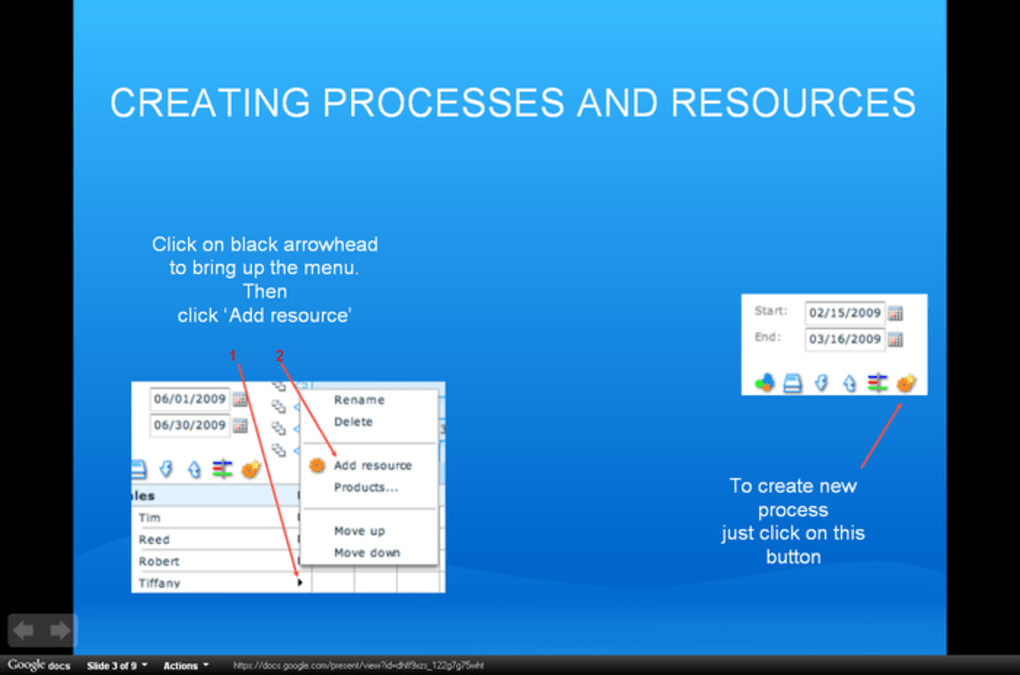
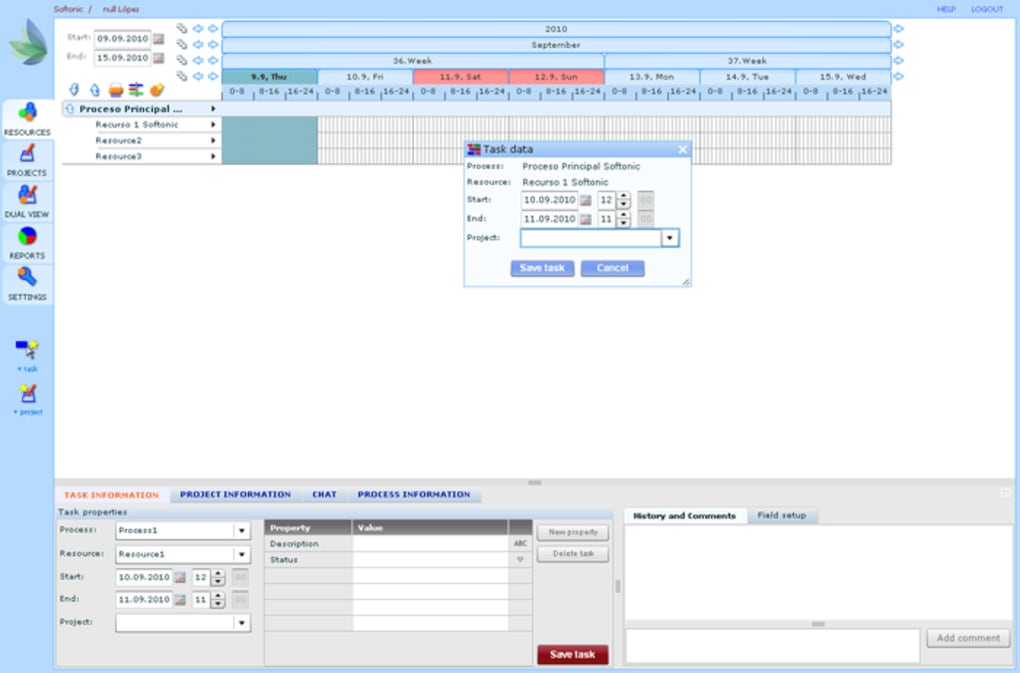
Once logged in, click “Create New Project,” give it a name, and define the date range. Add resources (people, equipment, or budget items) by importing a CSV file or entering them manually. Then, create tasks, assign resources, set durations, and watch the Gantt chart populate automatically.
The intuitive toolbar lets you resize, move, or link tasks with simple mouse gestures. For team collaboration, invite members via email; they will appear in the “Team” pane and can start commenting or chatting instantly. To generate a status report, select “Export CSV” from the “Reports” menu and download a spreadsheet that includes task progress, allocated hours, and resource utilization.
Compatibility
Because Ganttic is browser‑based, it is compatible with all major operating systems, including Windows 10/11, macOS Ventura and later, Linux distributions, as well as mobile platforms such as Android 8+ and iOS 13+. The responsive design ensures that the Gantt chart remains usable on tablets and smartphones, though the full feature set is best experienced on a desktop or laptop screen.
Pros & Cons
Pros
- Fast onboarding – a functional schedule can be built in under an hour.
- Drag‑and‑drop interface reduces the learning curve compared to traditional PM tools.
- Real‑time updates keep every stakeholder on the same page.
- Lightweight, web‑only solution eliminates the need for local installations.
- Secure SSL encryption and GDPR‑compliant data handling.
- Free tier available for small teams or trial purposes.
Cons
- Lacks built‑in document attachment and versioning features.
- No automated email or SMS notifications for task completion.
- Advanced project‑portfolio management capabilities are limited.
- Reporting is limited to CSV export; no native PDF or dashboard visualizations.
- Customization of Gantt chart styling is minimal.
Ganttic delivers a clean, focused experience for teams that simply need to see who is doing what and when. While power users may miss the depth of MS Project, the speed and simplicity make it an excellent choice for startups, agencies, and department‑level project tracking.
Frequently Asked Questions
Is Ganttic free to use?
Ganttic offers a free tier that supports up to three active projects and a limited number of users. Paid plans unlock additional projects, advanced reporting, and higher resource limits.
Can I integrate Ganttic with other tools like Slack or Google Calendar?
Ganttic provides native integration with Google Calendar for syncing deadlines, and it offers a webhook API that can be connected to Slack or other third‑party services through custom scripts.
How secure is my project data?
All data transmitted between your browser and Ganttic’s servers is encrypted via SSL/TLS. The platform also complies with GDPR and ISO‑27001 standards for data protection.
Does Ganttic support mobile devices?
Yes. Ganttic’s responsive web app works on Android and iOS browsers, allowing you to view and edit schedules on smartphones or tablets, though the full drag‑and‑drop experience is optimized for desktop screens.
Can I export my project schedule as a PDF?
Direct PDF export is not built into the free version, but you can print the Gantt chart to a PDF using your browser’s print‑to‑PDF feature, or upgrade to a paid plan for enhanced reporting options.
Conclusion & Call to Action
If you’re looking for a straightforward, cloud‑based solution that lets you visualise project timelines, allocate resources, and collaborate in real time without the complexity of enterprise‑grade software, Ganttic is a strong contender. Its drag‑and‑drop Gantt chart, instant chat, and CSV reporting provide just enough functionality for most teams while keeping the interface clean and easy to learn. For organizations that need heavy document management, automated notifications, or deep portfolio analytics, a more robust platform may be required. However, for startups, marketing agencies, or internal department projects, Ganttic offers a fast, secure, and affordable way to keep work on track.
Ready to streamline your project scheduling? Create your free Ganttic account today and start building visual timelines in minutes.



.png)



